A deep dive into QEMU: a new machine
In this post, we will see how to create a new machine. Opportunity is given to introduce the so called QOM.
Available Machines and CPUs
The available machines for a given architecture can be listed with the -M ? command line option.
For the RISC-V target architecture we have:
$ qemu-system-riscv64 -M ?
Supported machines are:
amd-microblaze-v-generic AMD Microblaze-V generic platform
microchip-icicle-kit Microchip PolarFire SoC Icicle Kit
none                 empty machine
shakti_c             RISC-V Board compatible with Shakti SDK
sifive_e             RISC-V Board compatible with SiFive E SDK
sifive_u             RISC-V Board compatible with SiFive U SDK
spike                RISC-V Spike board (default)
virt                 RISC-V VirtIO board
Once you picked-up your favorite machine, you can also choose between available CPUs for the related machine.
$ qemu-system-riscv64 -M virt -cpu ?
  rv32
  rv32e
...
  sifive-u54
  thead-c906
...
The clabpu machine
Let's create a new machine to support the clabpu machine. This is adopted from the Airbus CPIOM machine.
The CLab Processor Units (CLabPU) are imaginary machines designed to run the CLab Operating System (CLabOS). They are based on thead-c906 RISC-V CPU based embeded equipements with RAM, Flash, NVM, Timers, Interrupt controller, DMA engine, PCI controller and others components we won't cover (AFDX, DSP).
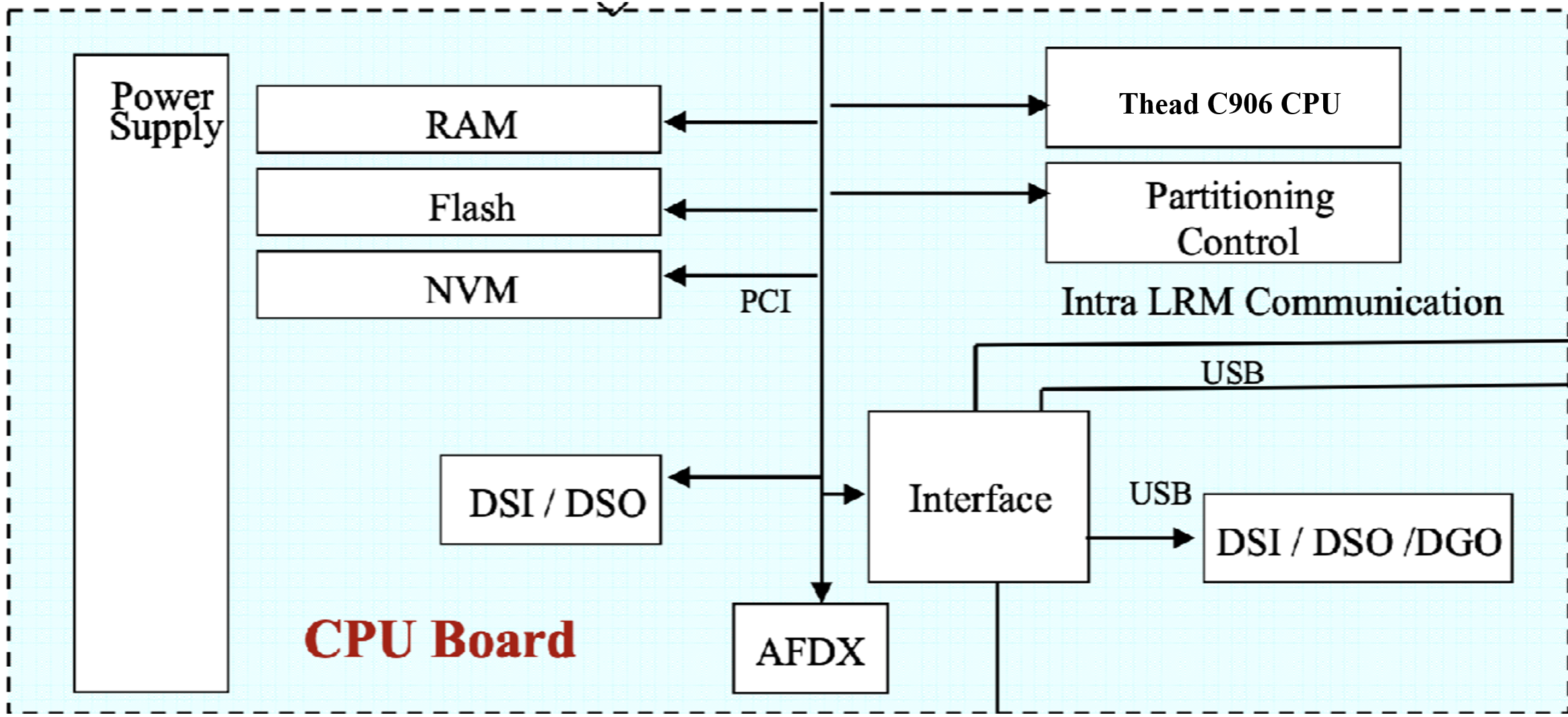
Code organisation
First let's prepare our environment by isolating our clabpu code in a dedicated directory. Usually, every single object you add to QEMU should be placed in the right directory. They are organized by nature, not target usage or association.
- a new RISC-V based machine should land in
hw/riscv/ - a new serial device in
hw/char/ - a new PCI host controller in
hw/pci-host/ - a new network controller in
hw/net/ - ...
So let's do the opposite and put everything at the same place in hw/riscv. The first thing we have to do is tell QEMU how to build our new machine and futur devices:
$ cat hw/riscv/meson.build
...
riscv_ss.add(when: 'CONFIG_CLABPU', if_true: files('clabpu.c'))
...

$ cat hw/riscv/Kconfig
...
config CLABPU
    bool
    default y
    depends on RISCV64
    select RISCV_NUMA
    select HTIF
    select RISCV_ACLINT
...
Creating a new machine: hw/riscv/clabpu.c and include/hw/riscv/clabpu.h
To implement a new machine in QEMU we will need to create QOM TypeInfo and its associated MachineClass and MachineState initialization functions.
You can find documentation about QOM conventions.
We put type definitions in include/hw/riscv/clabpu.h:
#ifndef HW_RISCV_CLABPU_H
#define HW_RISCV_CLABPU_H

#include "hw/boards.h"
#include "hw/riscv/riscv_hart.h"
#include "hw/sysbus.h"

#define TYPE_CLABPU_MACHINE MACHINE_TYPE_NAME("clabpu")
typedef struct CLabPUState CLabPUState;
DECLARE_INSTANCE_CHECKER(CLabPUState, CLABPU_MACHINE, TYPE_CLABPU_MACHINE)

void clabpu_machine_init(ObjectClass *oc, void *data);

struct CLabPUState {
    /*< private >*/
    MachineState parent;

    /*< public >*/
    RISCVHartArrayState soc;

};

#endif // HW_RISCV_CLABPU_H
The TypeInfo
We will register a new machine type in QEMU. This is done by defining a TypeInfo structure.
static const TypeInfo clabpu_machine_typeinfo = {
    .name       = MACHINE_TYPE_NAME("clabpu"),
    .parent     = TYPE_MACHINE,
    .class_init = clabpu_machine_init,
    .instance_init = clabpu_machine_instance_init,
    .instance_size = sizeof(CLabPUState),
};

static void clabpu_machine_init_register_types(void)
{
    type_register_static(&clabpu_machine_typeinfo);
}

type_init(clabpu_machine_init_register_types)
This will register a new machine class type for our CLabPU. This is the highest level definition.
The MachineClass
As the API states, our class_init function will be called after all parent class init methods have been called. The class is initialized before any object instance of the class.
Let's write it :
void clabpu_machine_init(ObjectClass *oc, void *data)
{
    MachineClass *mc = MACHINE_CLASS(oc);

    mc->desc = "CLab Processor Units";
    mc->init = clabpu_init;
    mc->default_cpu_type = TYPE_RISCV_CPU_THEAD_C906;
    mc->default_ram_size = 0x80000000; // 2GB
    mc->default_ram_id = "clabpu.ram";
    mc->max_cpus = 1;
    mc->default_cpus = 1;
    // riscv specific properties
    mc->possible_cpu_arch_ids = riscv_numa_possible_cpu_arch_ids;
    mc->cpu_index_to_instance_props = riscv_numa_cpu_index_to_props;
    mc->get_default_cpu_node_id = riscv_numa_get_default_cpu_node_id;
    mc->numa_mem_supported = true;
}
At this point we are able to define specific properties of the machine, such as the CPU model, the RAM size, and most importantly the instance initialization method clabpu_init.
The MachineState
Once the class is ready, an object instance will be created. We previously provided an mc->init = clabpu_init function.
static void clabpu_init(MachineState *machine)
{
    CLabPUState *clabpu = CLABPU_MACHINE(machine);

    clabpu_init_cpu(clabpu, machine);
    clabpu_init_mem(clabpu, machine);
    clabpu_init_dev(clabpu, machine);
    clabpu_init_boot(clabpu);
}
The core features of our board implementation will lie here.
Initializing a CPU for the CLabPU: Thead C906
RISC-V machines in QEMU often use hart arrays to manage multiple CPU cores (harts). The cpu instantiation will look like the following:
static void clabpu_init_cpu(CLabPUState *clabpu, MachineState *machine){
    int base_hartid, hart_count;
    char *soc_name;
    if (riscv_socket_count(machine) != 1) {
        error_report("number of sockets/nodes should be 1 for CLabPU");
        exit(1);
    }

    if (!riscv_socket_check_hartids(machine, 0)) {
        error_report("discontinuous hartids in socket0");
        exit(1);
    }

    base_hartid = riscv_socket_first_hartid(machine, 0);
    if (base_hartid < 0) {
        error_report("can't find hartid base for socket%d", 0);
        exit(1);
    }

    hart_count = riscv_socket_hart_count(machine, 0);
    if (hart_count < 0) {
        error_report("can't find hart count for socket%d", 0);
        exit(1);
    }

    soc_name = g_strdup_printf("clabpu-socket0");
    object_initialize_child(OBJECT(machine), soc_name, &clabpu->soc,
                            TYPE_RISCV_HART_ARRAY);
    g_free(soc_name);
    object_property_set_str(OBJECT(&clabpu->soc), "cpu-type",
                            machine->cpu_type, &error_abort);
    object_property_set_int(OBJECT(&clabpu->soc), "hartid-base",
                            base_hartid, &error_abort);
    object_property_set_int(OBJECT(&clabpu->soc), "num-harts",
                            hart_count, &error_abort);
    sysbus_realize(SYS_BUS_DEVICE(&clabpu->soc), &error_fatal);
}
Obtaining a RISC-V CPU state object
RISC-V uses the concept of "harts" (hardware threads) and they are typically managed through hart arrays. The CPU type we want is the Thead C906, which is defined in the RISC-V CPU models.
The Thead C906 CPU initialization can be found in target/riscv/cpu.c. This initialization sets up the Thead C906 with its specific extensions and configuration, including the Thead-specific instruction extensions.
Accessing RISC-V CPU State
QEMU provides dynamic type cast macros for safe navigation through inherited classes:
CPUState        *cs       = CPU(cpu_obj);
RISCVCPU        *riscv    = RISCV_CPU(cs);
CPURISCVState   *env      = &riscv->env;
The RISC-V CPU state structure contains RISC-V specific registers and configuration. You can found the definition in target/riscv/cpu.h.
To access general purpose register x14 (GPR[14]):
uint64_t gpr14 = env->gpr[14];Conclusion
You can see that a new machine is shown in the list of available machines. Don't forget to build and install your QEMU before running the command:
$ qemu-system-riscv64 -M ?
Supported machines are:
...
clabpu               CLab Processor Units
...
Try init a CLabPU machine with the following command:
$ qemu-system-riscv64 -M clabpu -cpu thead-c906 -nographicThis is not exhaustive, but you got the point. If you want to learn more about RISC-V CPU models, you can refer to the RISC-V CPU Models documentation.
Side note
QEMU has its own conventions and programming style. Let us take DECLARE_INSTANCE_CHECKER as an example. DECLARE_INSTANCE_CHECKER is a macro introduced in QEMU's QOM (QEMU Object Model) to provide type-safe casting functions for object instances. It's part of QEMU's effort to modernize and standardize the way object types are declared and used throughout the codebase.
Syntax
DECLARE_INSTANCE_CHECKER(InstanceType, MACRO_NAME, TYPE_NAME)Where:
InstanceType: The C struct type for your object instanceMACRO_NAME: The name of the generated cast macro (typically uppercase)TYPE_NAME: The QOM type name string
The macro expands to create a static inline function that:
- Checks if the object is of the correct type (in debug mode)
- Performs a safe cast to the target type
- Returns NULL if the cast is invalid (in debug mode)
Also, the object lifecycle is managed through QOM, which includes object creation, initialization, and destruction. Don't use gnew_ or g_malloc0_ to allocate memory for QOM objects. Instead, use object_new() or object_initialize_child() to create and initialize objects properly.